Looking for Something Specific? Search it Here

The First 5 Things You'll Want to Know About Tablet Computers

The First 5 Things You'll Want to Know About Tablet Computers

If you're new here, or to Tablet PC's, there's a few things you should know. A few bits of information we should get out of the way first...

1. The Tablet I use is a PC, Not a Mac
Everything but the iPad is Windows based. Mac's tablet the iPad is more like a giant iPod Touch, it wasn't designed to have a stylus/pen input, but there are several apps for that now, but you can either type (using the virtual keyboard) or use your finger to write. Also, the only way you can get anything on the computer is through email, there are no input ports, but i understand on the iPad 3 that might have changed. But don't dispare, this is only the third version of the Mac tablet, and only the first since Steve Jobs passed, so there's bound to be a bit of a shake down cruise since he's gone, and they'll probably come out with one that has a few more input choices. In the mean time, there is an after market/third party 'upgrade' you can get that will turn a MacBookPro into a tablet computer, but I'm not sure of the cost. (If you're interested in that, leave a message here, or better yet email me at tmoodyca@roadrunner.com and I'll hook you up with people in the know about such things), i will tell you that from what i have seen it partitions the harddrive so that you can run both Mac & Windows. So you'd still be running Windows programs just on a Mac machine.

2. What Kind of Tablet is Right for Me?
There's two different types of Tablet PC's. A slate tablet, and a convertible. The slate does NOT come with a keyboard but is usually lighter in weight, but a bit more expensive. The convertible allows the screen to swivel all the way around and lay flat on top of the keyboard. These are a bit heavier (although not by an enormous amount), but they cost less. Poke about in this blog to find some of the manufactures of both types of computer, or contact me via email at the above address.

3. Using Tablet PC's On-Set
Every Tablet PC comes with the program - Windows Journal, Journal Note Writer, or something like that, in it. The name varies, but it's exactly the same program & Script Supervisor's can use this program to take their notes AND line their pages. It does NOT turn your handwriting into text. You can enter text in this program, it just takes a few more menu scrolls and pen clicks, but it can be done. You'll have to decide if it's worth the effort. Other programs I know Script Supers to use are Excel, Filemaker Pro, Access, Adobe Acrobat, & Bluebeam Revu (more about those last two in section 4.)

4. PDF Readers & Printers
You may not know what it is, but you're going to need it. It's a program (or programs) that will allow you to read and print your pages and forms into PDF. PDF is a universal format that every computer, both PC and Mac, can view. There's a couple of different ways to achieve this, some more expensive than others, but all viable ways to go. The Acrobat Reader is free and easy to download, but that's just about all it does. And there are several programs out there that are just PDF printer drivers and those are either free or at a nominal cost. Or you can go with a couple of different PDF Editors. These allow you to read, print and manipulate PDF files. The two most well known are Adobe Acrobat, and Bluebeam Revu. I believe both have a 30 day free trial that can be downloaded from their websites. (There are other PDF Editors out there, just Google for a list.) These can be used to take your notes and to line your pages as well. However there is a little bit more of a learning curve involved with all of them.

5. eBay - A cheaper way to shop
Ok, you've decided to jump in and do the deed, but you're a little tight on cash. Or you're still a bit skittish about the whole thing because you're a Mac and it's a PC. Here's my recommendation: go eBay. First you're gonna want to do a bit of research. Find the make and model of computer you like (HP, Lenovo, Motion Computing, Dell, Tablet Kiosk, etc.), then I suggest going to Fry's or Best Buy, or Sears, and basically fondling the merchandise. Find something that you like the feel of, the weight of. You like the way the pen writes on the screen. See what software it comes with (Microsoft Word, or Excel, etc.), what hardware (external hard drive, or keyboard, etc.). Find the one that's right for you. Do NOT skip this step, I know the research is often the boring part, but in this case it's important. You are going to have to spend at least 12 1/2 hours a day with this machine, and a fairly large chunk of money, so it should be something you like. After you've researched it and found the machine of your dreams, then head to eBay. First just see what they have to offer in tablets, you might find something you didn't know about. Then get down to business, and look for that one computer that will make your life complete. Now you might have to settle for last years model (so make sure you get the name and numbers correct), but if it comes at a significant discount (on the order of one half the price or so) you'll have a decision to make.

So there you are, the first five things you need to know. Go forth and compute.

Sunday, June 14, 2009

Point by Point Review of the HP TouchSmart TX2 Convertable Tablet PC

very good review of the HP TX2


- Script Witch
~~~~~~~~~~~~~~~~~~~~~~~~

A look at the HP TouchSmart TX2

June 14, 2009 at 6:28 am | Craig Pringle |

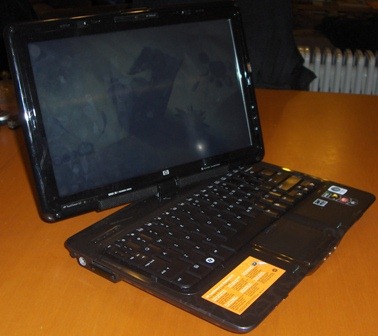
I’ve been lucky enough to be playing with an HP TouchSmart TX2 Tablet PC for the last couple of weeks. HPIM1894

I will not be doing a full review of the unit as it ships for the simple reason that one of the first things I did was rebuild it with the Windows 7 Release Candidate so I could look check out the new Windows Touch experience on a multi-touch capable machine.

That is not to say that I am not going to review it here – just that I won’t be reviewing the software that ships on the device. I am going to break the review into two parts. In Part 1 – this post – I’ll give you a tour of the TouchSmart TX2 hardware. Part two will drill down into the Windows Touch experience you will find with Windows 7 on a Multi-touch capable machine.

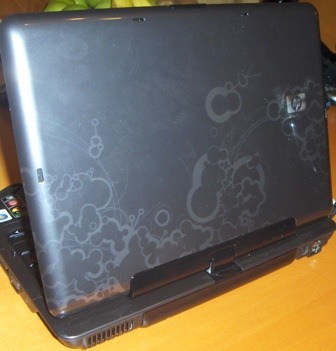
The HP TouchSmart TX2 – or TX2 for short – is a Tablet PC that is firmly aimed at the consumer market. It has been built with media and ease of use in mind. It begs to be touched. It also has a stylish finish that will look more at home in the living room than the board room. Check out the graphic on the lid.HPIM1903

On the front bezel you will find the power switch, IR Receiver, and the usual jacks and a hardware switch for the wireless.

HPIM1889

But hang on – on closer inspection the three jacks are not that usual after all. Left-to-right the first 3.5mm jack can be used either as an optical output to hook into your home theatre system or for HPIM1890 your headphones. The middle one can be used for a second pair or headphones which is a nice touch on a media notebook. the third jack is a microphone line in.

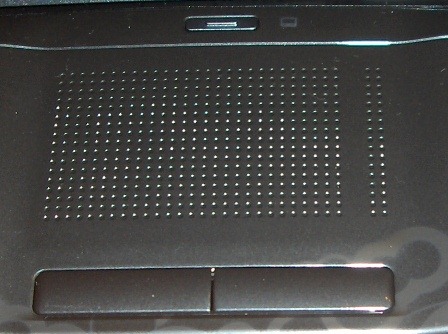
The keyboard is fairly standard, as is the touchpad in front of it. One nice touch is the hardware button directly above the touchpad, which can be used to disable or enable it. I like the placement. I frequently disable and enable the touchpad when I am typing on my mobile devices because I have a bad habit of tapping the touchpad with my thumbs and this can move the cursor. The placement on the TX2 is excellent and the little picture of the touchpad next to the button glows white when the touchpad is enabled and red when it is disabled.

HPIM1892

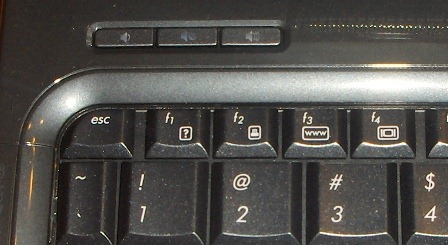
Above the keyboard on the left side are three hardware buttons for volume down, mute and volume up.

HPIM1896On the right side of the screen there is a fingerprint reader and three hardware buttons. I did not install the button driver in Windows 7 as I don’t know if it is going to be the same as the Vista one or not and I didn’t want to set false expectations.HPIM1898

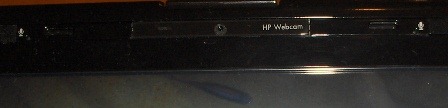
On the top edge of the screen there is a webcam, flanked on either side by two microphones in an array. Microphone arrays are by far superior to single microphones for voice applications so this should make the TX2 excellent for use with Skype, Live Messenger or other voice applications.

At the base of the screen there are two Altec Lansing speakers and the sound quality is really pretty good for a notebook.

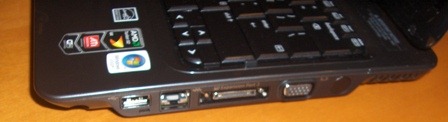
On the right side there is the stylus, one USB port, the network port, a proprietary expansion port, a VGA connector and a vent.

HPIM1900

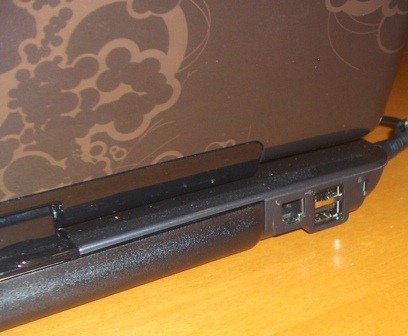
On the back there is a modem jack, two more USBs and the lock port.

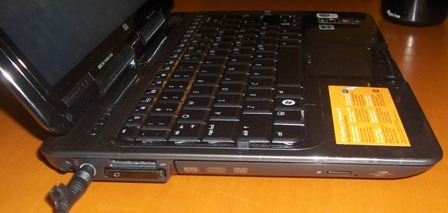
HPIM1901On the left side there is the power in, a card reader (SD, Memory Stick and MS Pro, MMC & XD) and a PC Express slot. There is also a CD/DVD burner.HPIM1905

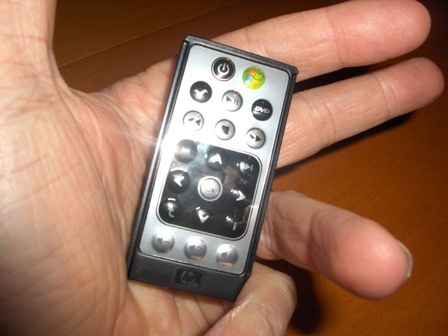
Tucked away in the PC Express slot is one of my favourite features. A little remote for Media Center. Isn’t it cute?

HPIM1910 The hinge is very sturdy and the TX2 does not suffer much from the wobbly head that plagues most convertibles. On either side of the keyboard there is a little raised peg. Once the screen is rotated around the magnetic latch clicks into place the two pegs fit into recesses on the lid which gives the device a nice secure feel in slate mode.

There is a lot to like about the TX2. Below are some of the highlights for me.

  • Great styling
  • Functional design
  • Multi-touch – that’s a big one.
  • Nice active digitiser as well
  • Great screen and sound for a notebook of this size.
  • That funky little remote!

On the down side:

  • There is a fair bit of fan noise.
  • The battery life is not great. I suspect that this is a side effect of the fairly high-end video processor and CPU. I would give a bit away here to be able to watch a whole movie on battery.
  • No eraser on the stylus
  • Volume control buttons are covered when converted to slate mode. When you are in slate mode, that is when you need your hardware buttons!

Over all a good home machine that will handle all the browsing and media that you throw at it with ease and will also not balk at a bit of gaming. The multi-touch experience is great in Windows 7 – but that will be the topic of my next post.

New Fujitsu Tablet PC

looks good, suggest you take a look at the upgrade options. but at 3.5 to 4lbs (depending upon which battery you have), 7.5 or 11.3 hours of battery life, plus all kinds of included and optional capabilities, it might be what you're looking for.


- Script Witch
~~~~~~~~~~~~~~~~~~~
June 13, 2009 at 11:20 am | Rob Bushway |

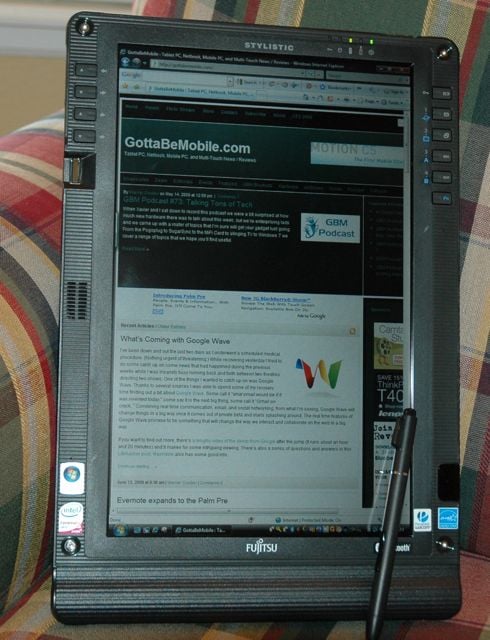
Fujitsu ST6012 Tablet PC Arrives, First Impressions

st6012 tablet pcUpon returning from a trip down south, I was pleased to find a box from Fujitsu waiting patiently for me. As any geek worth his salt would do, I immediately opened it up and was pleased to find an ST6012 Tablet PC!

I’ve only had the ST6012 for a couple of days, but my initial impression is very positive. I’ve found the ST6012 to be extremely light and have just about every option I could possibly want: SD card slot, a dedicated PC card slot, smart card reader, lots of configurable buttons on both the right and left side of the screen, and a very nice 1280 x 800 indoor / outdoor display. In addition, the standard 6-cell battery is giving me between 4 and 5 hours of battery life. An optional 9 cell high capacity battery is also available. An optional web camera (not on this eval unit) is also available.

The only negative I’ve found is that the 1.4 ghz Core 2 Duo Ultra Low Voltage tablet pc runs a bit sluggish. This evaluation unit only has 1 gb of RAM and it has an 80gb HDD, so that doesn’t help much either. In addition, the ST6012 is running 88 processes out of the box on this Vista Business factory installation. Upgrading the RAM and going with an SSD certainly would help things. I might install Windows 7 on this Tablet PC just to try the performance and inking, but will mostly concentrate on the Vista installation for purposes of my review since Windows 7 isn’t out yet.

It certainly is light weight and quiet though, and is a joy to hold in my hands. Inking is also quite smooth. The felt cloths in the back are a welcome change from other tablet pcs.

Stay tuned for more on the ST6012, including some pictures, more impressions, and an InkShow. Post any questions you have and I’ll try to address them in future articles.

The ST6012 is available for $1999.

Friday, June 12, 2009

8.9" Tablet PC - Resistive Touchscreen

this looks very interesting. a very small tablet pc that weighs less than 2lbs. will have Windows 7 as an operating system (OS). the touchscreen may or may not be a good thing. would depend upon whether or not the side of my hand activated programs while i was trying to write my notes, but it would be great if you're a touch typist perhaps.

check out the demo video at the end, taken at the recent Paris unveiling.


- Script Witch
~~~~~~~~~~~~~~~~~~~~~~~~~~~~~~~~~~~~~~~~~

Video: Archos 9 pctablet resistive touchscreen impresses

Archos attempt to resurrect the UMPC category of devices got off to a good start yesterday in Paris with the launch of its 16-mm thick Archos 9 pctablet -- a 8.9-inch 1024x600 pixel tablet riding an 800MHz or 1.2GHz Atom Z515 processor, 1GB of memory, up to 120GB disk, webcam, Bluetooth 2.1, 802.11b/g WiFi, and SIM card slot for WWAN connectivity. Archosfans just posted a video of the Archos 9 prototype in action and honestly, that resistive touch-screen looks pretty damn impressive to finger taps. However, since it's running Windows 7, a full-blown desktop OS, you'll still need to pull out the included stylus on occasion to interactive with the Windows 7 UI or applications designed for a mouse and keyboard. Fortunately, the Archos 9 offers an optical mouse on the right-side bezel and left and right mouse keys along the left. Other notable highlights include a removable battery of undetermined capacity, a docking port for added expansion (Ethernet, 2x USB, VGA output), stereo speakers, and an adjustable kickstand for viewing video or working on the Archos 9 with attached USB keyboard and mouse. The Archos rep says it'll be priced between €450 and €500 when it ships around the time Windows 7 launches at the end of October. What we're wondering is how much finger-friendly UI customization will be included by Archos and how they plan to market the device to consumers who already own smartphones, laptops, and even netbooks. Video after the break.

P.S. While Archosfans claims the Archos 9 is multi-touch, nothing that we've found supports that claim on the Archos site or in the video demonstrations. Nevertheless, multi-touch resistive touchscreen technology does exist as demonstrated to us by Stantum back in February. In fact, the ASUS Eee PC T91 also features an 8.9-inch resistive display that does support mult-touch.

Eye-Fi Pro - Transfer Your Pictures From Camera to Computer Wirelessly

.
ok, this is very cool. it's an SD card that you can buy that comes in 2G and 4G and it has built in WiFi. what that means is you can put it in your camera and once you program it, it will automatically send all the pictures you take, or only those you select, to your computer or several websites of your choosing.

so let's say your on set and you're taking your continuity photos and you send the ones you like to your computer and also to either Flickr, or Facebook, or Picasso, etc. You can give permission to only certain people to see these photos, so that they could be available to your 2nd Unit SS, and Director or AD, to the Makeup, Hair & Wardrobe people, to the Production Office, and on and on.

you could also set this up so only your friends & family members had access, for things like vacation and holiday pics. (be aware that at the moment these cards cost between $50 - $150 but prices should come down as they catch on.)

just the fact that it sends them to my computer without having to have a card reader is pretty cool to me...

take a look at the video below, be forewarned it's a bit long and you might have to mess with your volume to hear it better.


- Script Witch
~~~~~~~~~~~~~~~~~~~~~~~~~~~~~~~~~~~~~~~~


And if this looks/sounds a little too technical, go to Engadget, they have a great hands-on simplified walkthru of the card and it's capabilities.

there's even a version that is for VIDEO cameras. makes you wonder, doesn't it? :)
.

Today's On Set Computer Rig of the Week

Here's a friend's on-set rig. she's using a Mac and the ScriptE software. am kinda liking the stand, especially the little sidecar thingy.

if you have a set-up you think others might want to see, send me the pics and i'll post them here.


- Script Witch
~~~~~~~~~~~~~~~~~~~~~~~~~~~~~~~~~~~~~~~~~~~~


Tuesday, June 9, 2009

CTL 2GO Mini Convertable Tablet PC Netbook

a little tablet, the screen is only 8.9 inches. upgradable to 2GB RAM. weighs less than 3 lbs


~~~~~~~~~~~~~~~~~~~~~~


CTL 2GO Convertible Classmate PC 8.9" Laptop/Tablet with Hard Drive with Windows XP Home


The CTL 2go™ Convertible Classmate PC with Intel Atom processor has a rotating screen which easily converts from traditional Intel Classmate PC netbook format with keyboard entry to a resistive touch netbook tablet. The included stylus allows control of the 2go tablet touch screen as well as digital pen text input. This convertible tablet functionality enables a world of new usage options for use and control of the 2go™ Convertible Classmate PC.
Built on the Intel® Atom™ processor, the 2go™ Convertible Classmate PC is an Intel powered Classmate PC which features durable, drop and spill resistant construction with a sturdy plastic case and removable carrying handle to withstand demanding everyday use at school, in the house, on the job or when traveling.

* Microsoft® Windows® XP Home, Microsoft® Works 9.0 and lots of other great software Pre-Installed - the CTL 2go Convertible Classmate PC with Intel Atom processor is ready to go to work right out of the box!
* Dual mode of use – convertible tablet mode and traditional netbook mode – the CTL 2go Convetbile Classmate PC adjusts to changing usage needs
* When open like a traditional netbook, the 2go touch screen swivels 180 degrees for sharing with peers
* The 2go Convertible Classmate Touch screen & advanced palm-resting technology promote new models of interaction
* The 2go Convertible Classmate PC allows for writing (with handwriting recognition) or drawing directly on the tablet touch screen in a natural way
* The 2go Convertible Classmate PC built-in camera rotates 180 degrees to enable users to interact in a new way
* With a Removable carrying handle and lightweight compact size the 2go Convertible Classmate PC with Intel Atom Processor supports micro-mobility
* Durable construction; rugged outer case and water resistant keyboard are all key features of the CTL 2go Convertible Classmate PC.
* The 2go Convertible Classmate PC features touch-optimized software
* Includes 6 Cell Lithium Ion battery for up to 5+ hours usage per charge

View the 2Go Convertible Classmate PC Quick Start Guide PDF (opens new window)
Read Laptop Magazine's (www.laptopmag.com) review of the 2go Convertible Classmate PC here (new window)>>
NOTE: Due to very high demand, the 2go convertible classmate PC is sold out again and is currently on backorder.
We expect to receive more stock by JUNE 24th . At that time, our production department will build units in the sequence in which orders were received. We expect this next batch to sell out quickly, so to reserve yours, be sure to place your order today!
1:1 eLearning 2go Video

AVAILABILITY: Usually Ships in 1-2 Weeks
Quantity:
Configuration Options:

*Memory
1GB RAM Included in Total Price
Upgrade to 2GB RAM* Add $69.00

*Operating System
Microsoft® Windows® XP Home Pre-Installed Included in Total Price
Upgrade to Microsoft® Windows® XP Professional Pre-Installed Add $186.00

*Microsoft Office
No Microsoft Office Included in Total Price
Microsoft Office 2007 Home Basic Add $186.00
Microsoft Office 2007 Small Business Add $270.01
Microsoft Office 2007 Professional Add $358.81

Accessories
Add a NU(R) Brand External Slim USB SuperMulti Drive CD ROM/RW + DVD RW (ESW860) Add $78.00
Add an extra 2go Convertible Classmate stylus/pen to use as a spare Add $12.00
Add an extra 2go Convertible Classmate 6 Cell Lithium Ion Battery to use as a spare Add $89.00
Add an extra 2go Convertible Classmate AC Adapter to use as a spare Add $39.00

*Warranty
1 Year Parts and Labor Depot/Mail-In Warranty Included in Total Price
Upgrade to 3 Year Parts and Labor Depot/Mail-In Warranty Add $70.80


As configured:
Reg Base Price:$598.82
Base Price: $499.00
Customized Price: $499.00
- Hide Details -

* 1GB RAM
* Microsoft® Windows® XP Home Pre-Installed
* No Microsoft Office
* 1 Year Parts and Labor Depot/Mail-In Warranty

Quantity:


Fixed Specifications

Hands on video of the CTL 2go Convertible Classmate PC with Intel Atom Processor at
the 2009 CES Show by go Gotta be mobile (www.gottabemobile.com)

HARDWARE

CPU & PLATFORM

* Intel® Atom™ Processor N270 1.6GHz
* Intel 945GSE Chipset

2go TABLET UTILITIES

* Tablet Sensor: When switching from clamshell to tablet mode, display rotates 180-degrees
* Accelerometer: Display rotates as device is rotated

CARRYING HANDLE

* Carrying handle is easily removable. Just remove the battery, remove the 4 screws that affix the handle, remove the handle and replace the battery.


STORAGE

* 60GB 1.8" PATA HDD
* 2-in-1 SD/MMC memory card reader
* Supports boot from card reader and USB
* USB 2.0 Interface for external storage.

INPUT

* Water Resistant Physical Keyboard - when screen is rotated in clamshell mode
* Touch pad (Mouse)
* Touch Screen accepts handwriting recongnition and virtual on-screen keyboard


I/O PORTS

* 2 USB 2.0 Ports
* 1 x RJ-45 10/100 LAN
* 1/8" External Microphone-in jack
* 1/8" External headphone jack
* 2-in-1 SD/MMC memory card reader
* Kensington Lock Ready.
* VGA Port (15 Pin VGA)


MEMORY

* 1GB Standard (Upgradeable to 2GB)


NEWORK

* 10/100M Ethernet
* Wi-Fi 802.11 b/g/n with open mesh support (Linux Only)
o Mini-card form factor, single antenna
o Security: WPA, WPA-PSK, WPA2, WPA2-PSK


DIMMENSIONS AND POWER

* Size: 9.5" (W) x 7.5" (H) x 1.5" (D)
* Weight: < 3 lbs
* 6-cell Li lon Battery
* Battery life aprox 5hrs+ typical usage time


AUDIO, SPEAKER, MICROPHONE

* Integrated 2 channel audio w/ 1W speakers
* Built-in speaker and microphone


VIDEO

* 8.9'' LCD, 1024 x 600 Touch Screen
* Color LCD TFT, LED Backlight
* Digital LVDS Interface
* Integrated camera
* Driver / AP support Windows XP

WEB CAM

* Integrated 1.3MP webcam which rotates 180 degrees to allow creative interaction

OPERATING SYSTEM

* Microsoft® Windows® XP Home - Installed
* Supports Linux (ETA April 2009)

BATTERY

* 6 cell Lion Battery


WARRANTY

* 1 Year Depot/Mail-in Parts and Labor Warranty

OTHER

* Resisitive Touch Input
* Includes stylus/pen for resistive touch input
* Built-in accelerometer senses orientation and automatically switches screen between portrait and landscape modes

DROP TEST

* Ruggedized: Tested with 50cm Drop Test

Software and Utilities

* Microsoft® Windows® XP Home - Pre-Installed
* Microsof® Works 9.0 - Pre-Installed

Utilities

* Tablet Sensor Functionality: When switching from clamshell to tablet mode, display rotates 180-degrees
* Accelerometer Functionality: Display rotates as device is rotated
* Intel Quick Launcher
* Easy Network Manager
* Intel Power Manager
o Advanced power management for improved battery life and power efficiency
* Quick Control Panel
o Provides quick access to some key controls - particularly when in tablet mode
* Touch Screen Calibration
o Calibrates the touch screen based on 9 points

Pre-Installed Software

* Microsoft® Works 9.0 (On Windows XP Home Versions with 1GB RAM only)
o Works can help youcoordinate everything from little tasks to large projects. You can stay on topof your busy schedule, update your contact list, manage a household budget andkeep up with your correspondence. Works gives you the basic tools you need tomake your tasks easier from start to finish.
+ WordProcessor: Use the Works WordProcessor to easily create letters, resumes, greeting cards and more, withcustomizable templates, improved proofing tools and a built-in dictionary.
+ Spreadsheet:Keep to-do’sorganized, plan home improvements, or track your personal budget with the WorksSpreadsheet.
+ Calendar:Combine up to 32different calendars into one view to keep track of everyone’s plans with theWorks Calendar.
+ Database:Store addresses,lists, or home inventories in the Works Database.
+ Compatible with Microsoft Word and Excel 97-2007: Share & edit Works Word Processor and Spreadsheet files withMicrosoft® Office Word and Microsoft® Office Excel and vice versa.
* ArtRage 2 - Painting tool
o ArtRage is a fun and easy-to-use painting tool that lets you play with realistic paints on your computer. You can create your own paintings from nothing, load in photos, and recreate them with oil paints, pencils, felt pens, or any of the other tools ArtRage has to offer.
* MyScript Stylus - Handwriting recognition
o Write naturally on your TabletPC or Graphic Tablet screen and MyScript Stylus Windows converts your handwriting into computer readable and exploitable text!MyScript Stylus Windows replaces your keyboard in applications requiring text entry. MyScript Stylus Windows transforms your handwriting into typed text and inserts it at the position of the cursor in the application you are working with (text editor, task manager, calendar, etc.). MyScript Stylus Windows is available in two language configurations (English and French) and understands both hand printed and cursive handwriting.MyScript Stylus not only provides handwriting and character recognition, it also provides a virtual on screen keyboard and math keyboard which accept input by taping on the screen (useful when the screen is folded into tablet mode and the keyboard is not available)
* FBReader - e-book reader
o FBReader is an e-book reader which supports several e-book formats including: fb2, html, chm, rtf, plucker etc.. Direct reading from zip, tar, gzip and bzip2 archives is also supported. FBReader can read FREE e-books which can be downloaded from resources such as these:
+ http://www.memoware.com/
+ http://manybooks.net//
+ http://www.gutenberg.org/catalog/
+ http://www.baen.com/library/
+ http://www.gutenberg.net.au/plusfifty.html
* Foxit Reader - pdf viewer
o Foxit reader is a very fast and efficient tool for opening, viewing, commenting and printing PDFs. Annotation tool: Foxit Reader allows you to draw graphics, highlight text, type text and make notes on a PDF document and then print out or save the annotated document. Save fillable forms after filling them out so you can continue anytime. Text converter: You may convert the whole PDF document into a simple text file. High security and privacy: Foxit Reader highly respects the security and privacy of users and will never connect to the Internet without users' permission while other PDF readers often silently connect.
* ArcSoft Webcam Companion - webcam tools
o ArcSoft WebCam Companion offers a broad range of applications designed and optimized for webcam use, whether utilized to record video or to take a special photo, ArcSoft WebCam Companion lets you get the most out of your netbook's webcam.
* Evernote - Note-Taking
o Evernote allows you to easily capture information in any environment using whatever device or platform you find most convenient, and makes this information accessible andsearchable at any time, from anywhere.
o Watch Evernote in action: Evernote youtube video (opens new window)
Walk & Type/Write

A portable desk. Cool, but kinda looks like you're a peanut seller at a baseball game.

Could be very useful for those currently using a stand and wanting to be more mobile.


- Script Witch
~~~~~~~~~~~~~~~~~~~~~~~~~~~~~~~~~~


Walk and type at the same time!

Walking upright is a sure sign that you're evolved, but we think you should take it one step further and walk upright while computing. The Connect-A-Desk is a new product that gives you the ability to use your laptop with both hands free, to type while walking or standing. Includes the laptop harness & desk, everything you need to use your laptop computer while standing. Works with any size laptop, notebook, or tablet computer. Adjustable to fit any size person. Quick and easy to put on and take off and ergonomically designed for comfort. It's truly mobile and portable, no need for a laptop cart or stand.

Connect-A-Desk makes any laptop truly mobile. Taking notes with a full size keyboard while having the ability to move around can be of great value to almost any laptop user.


  • Great for: archeologists, insurance adjusters, real estate appraisers, architects, engineers, students, site surveys, inspectors, inventory, warehouse, nurses
  • Fits into most computer bags
  • Straps can be removed for use as a lap desk
  • Dimensions: 11" x 14"
  • Weight: 1lb, 6oz

http://www.thinkgeek.com/computing/bags/a988/?cpg=ab

Price:
$24.99
Availability: [ info ]
In Stock
Quantity:
Geek Points Buy this and earn 125 Geek Points!
[ what's this? ]